Devlog: Darkslide - photo edits persistency, fulscreen list view and subscribe for updates
Hey, it’s Roman. Now it’s time to show more of the progress working on Darkslide - keyboard-driven photo editor for macOS. While I have been working on the app for while - it’s time to bring devlogs updates on regular basis.
Few good things happened recently.
Implemented persistency for photo adjustments.
Long time ago I used to be a commercial photographer. Photoshop and Lightroom were my main tools. Once photography shifted to be more like a hobby - I switched to CaptureOne, then Photomator. What I did not like in all of them: they cannot just store adjustments somehow without me managing either some .library file or even worse - a separate file for each image. It’s one of the pain points I would like to solve. I do not want to do any file management apart from the photos itself. The solution is - track an image in a various ways so the app can:
- get/save the adjustments
- detect if a photo was duplicated
- detect if a photo was moved
- and even if the tracking is broken - it should recover it
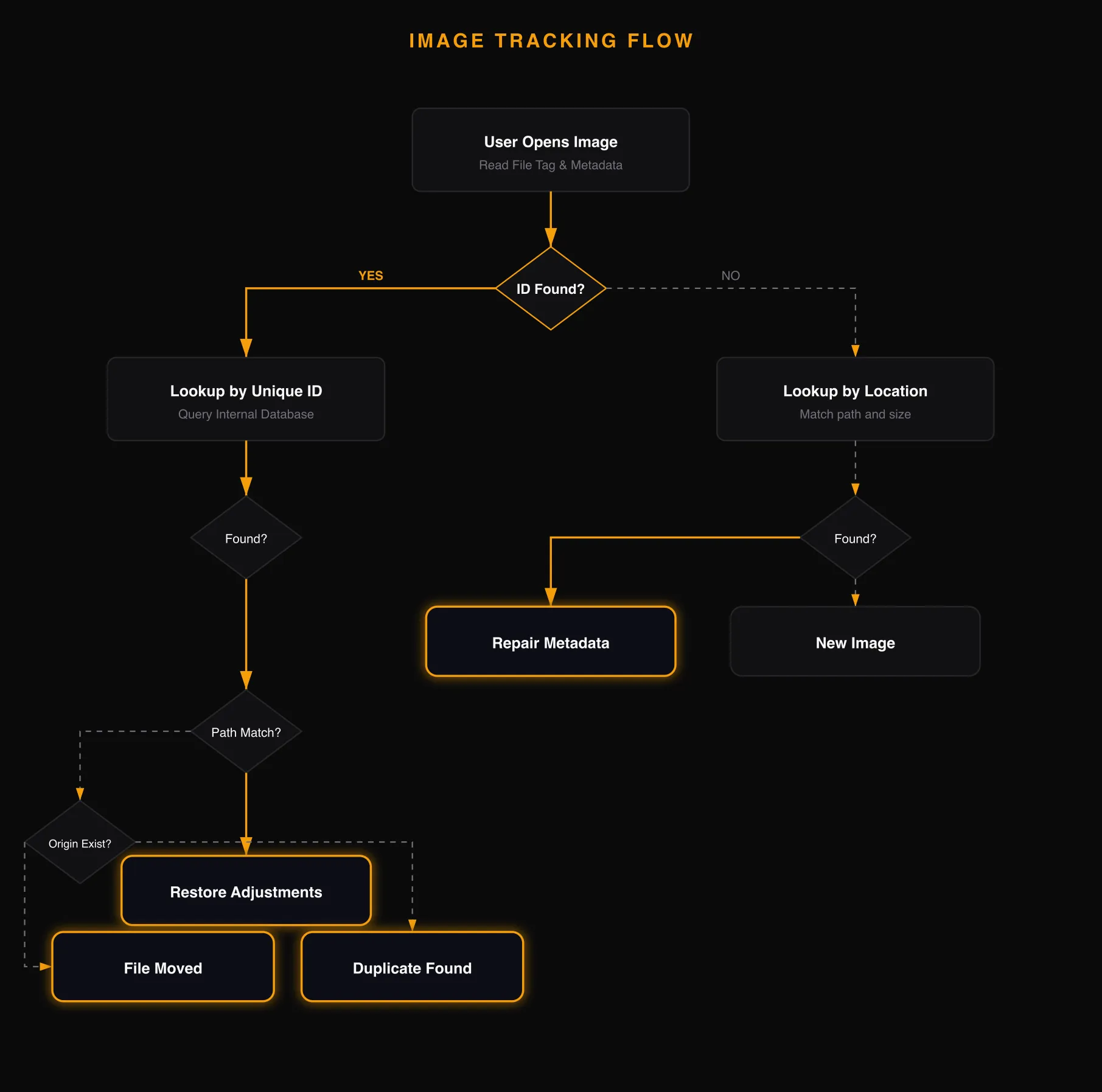 Leaving some technical details behind this is an attempt to made the management automatic. Here you can see the result:
- opened an image
- did some editing
- removed it from the editor
- loaded again
- all the edits are here.
Since it does autosaving that makes managing of edits much easier. Especially that you can even move files and all will work.
Fullscreen edit session preview
When you do photo editing - there is a bottom bar showing you all the photos. You can manage copy/paste from there, select to export. But horizontal preview is good for sequential editing.
But when I load like 200-300 images - using only bottom bar is not that convenient.
Solution: introduce fullscreen viewer for currently opened photos.
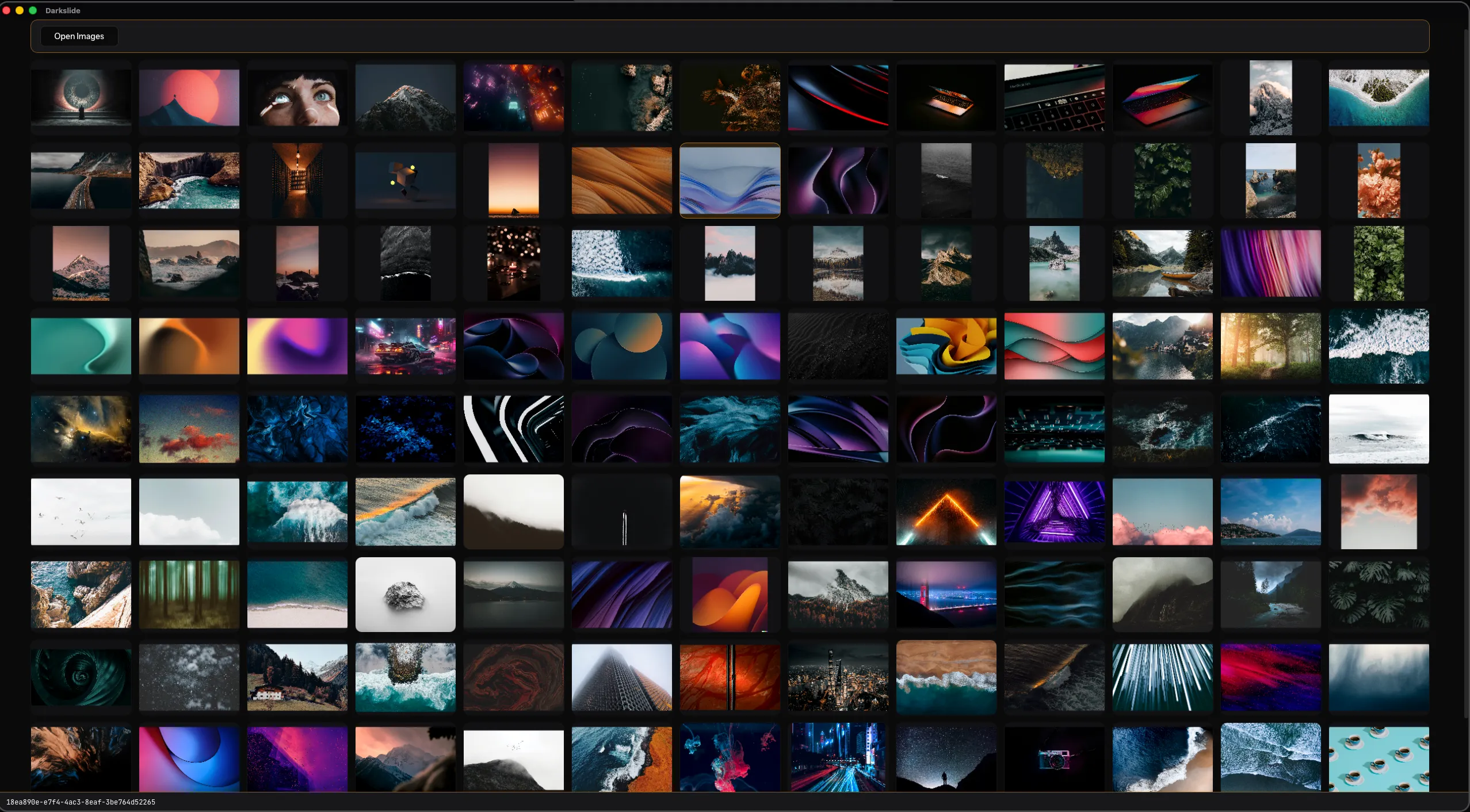 Simple as it could be for now
hjkl\arrowsnavigate you vertically and horizontallyshift+hjkl/arrowsexpands the selection for multi paste or to export resultsenterstarts the editingesccloses and returns back to previous editing In some way there is nothing technically interesting here: the component to show previews now has two states - for fullscreen and bottom layout. In future most likely it will grow in features as well. But for now - it does what is needed.
Website subscribe feature
It’s important to build the product itself, but the hardest part for me is working on what is called “marketing”. I am far away from understanding it good enough that the fact I am building this forces me to deal with it. I actually had a very niche app for macOS last year that I tried to market and find people. It failed and now the app is open sourced. To be fair I was not sure that specific version of the app will work out. But I tried. With Darkslide:
- I have more confidence it could interest people. I know enough people who generally tired of Adobe. Darkslide gives a very different UX to the process of editing, so I am not sure how many people will like it. But some will
- Even if the marketing fails - I will continue to build it anyway. In terms of editing features it’s getting close to what I need from photo editor color&light manipulations. I do not do heave precise adjustments.
One of the features is: subscribe for updates.
 The website is built with Astro, I did not want to serve full backend for simple landing page style website. But, I have a need to some intergrations.
As email provider I choose EmailOctopus as they give generous free tier.
But, it’s not good idea to add the integration right inside JS part. So, there is a “proxy” layer with Cloudflare function (and other Cloudflare features to prevent abuse) that makes the integration between the website and the EmailOctopus.
Nothing fancy, nothing hard. But it lives under website’s domain as backend endpoint. And hides all APIs keys.
So far no one subscribed, but, give me time.
The website is built with Astro, I did not want to serve full backend for simple landing page style website. But, I have a need to some intergrations.
As email provider I choose EmailOctopus as they give generous free tier.
But, it’s not good idea to add the integration right inside JS part. So, there is a “proxy” layer with Cloudflare function (and other Cloudflare features to prevent abuse) that makes the integration between the website and the EmailOctopus.
Nothing fancy, nothing hard. But it lives under website’s domain as backend endpoint. And hides all APIs keys.
So far no one subscribed, but, give me time.
And more
As always there is a work no one will ever see. The next big thing would be to make optimisations to handle 300 photos better. It already works now, but there are ways to improve speed, reduce memory usage and prepare the codebase for the real challenge - working with RAW files. Comparing to RAW files all others raster image types look like baby in front of bodybuilder.
Thank you for reading and see you next time, Roman
$ echo "test"
✓ Thank you! You are subscribed.