Does AI Make You Slower as Software Engineer? Testing myself.
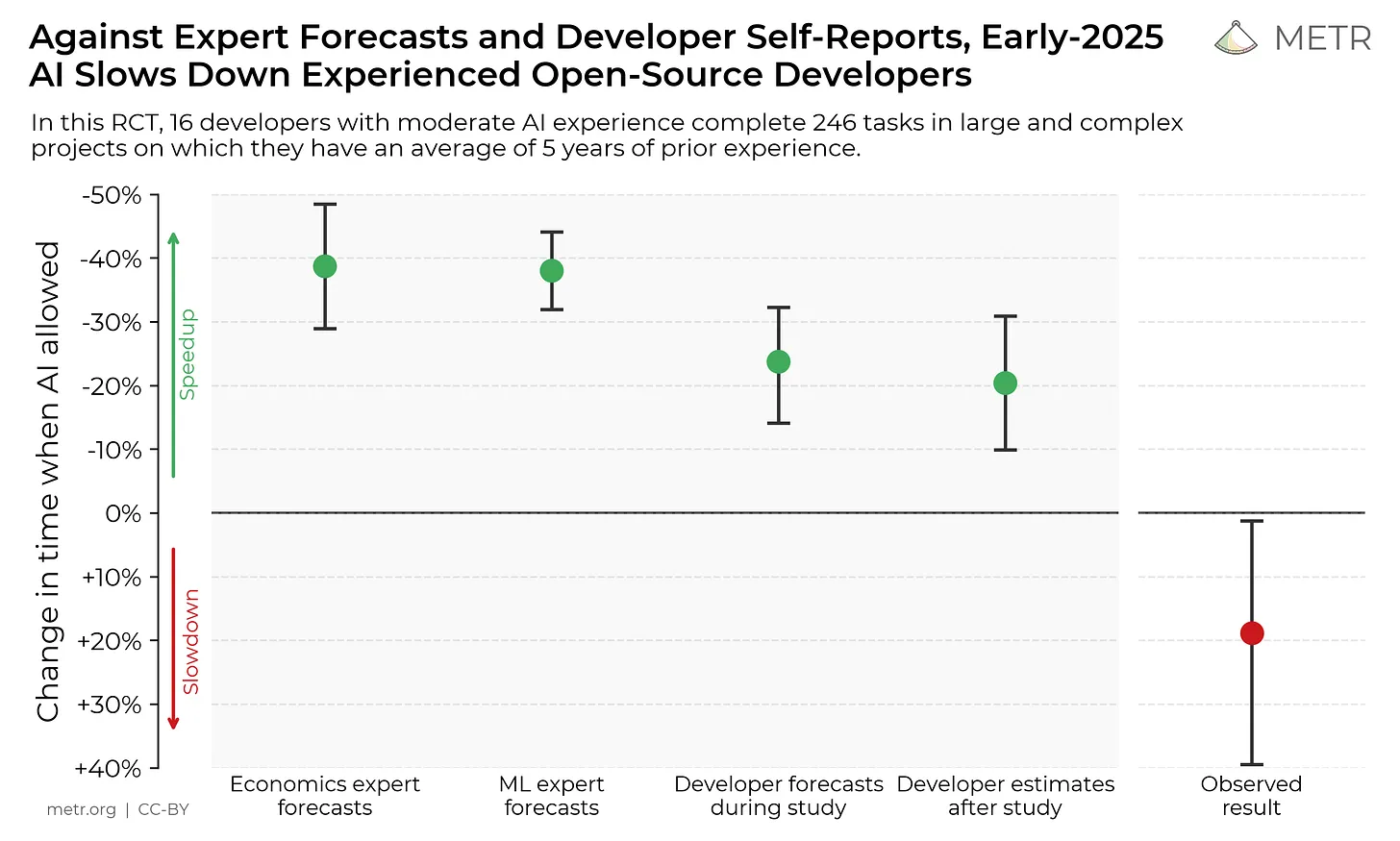
“Measuring the Impact of Early-2025 AI on Experienced Open-Source Developer Productivity” was released not long ago, and it got me thinking about my recent usage of AI tools.
While I was skeptical about the whole AI hype around software engineering, I still believe the best way to judge a tool is to use it, and then draw conclusions.
Interestingly, the research from the article shows that experienced developers spend more time finishing a task while they believe they are more productive. This is what I would like to discuss and compare with my own usage of AI tools.
The tools I use are: aider.chat and the Avante plugin for Neovim. They both provide a Cursor-close experience and allow selecting a model to use. From the most expensive ones via API from OpenAI or Anthropic, to local models like the small Ollama that can fit into a MacBook Pro’s M1 Pro memory.
Areas of development with AI Tool Application
Before we can go to conclusions I need to draw a picture about products I build and types of software engineering. Because results are different between them.
1. Development of a vector-based graphics editing tool and animation creation tool. They are an Apple-only (macOS and iPadOS) suite of products heavily built on Apple’s coding ecosystem: Swift, UIKit, Apple’s rendering frameworks, and many many internal algorithms around Bezier curves, animation system, on-device model inference, and rendering techniques. My area of application here is mostly the rendering part. It is much closer to development of 2D game engine than to classic iOS development.
2. Our backend for (1). Here, I would say things are pretty standard: AWS, GCP, Golang, IaC via Terramate, PostgreSQL, Redis, and so on. Nothing unusual compared to modern backends, especially compared to the level of non-standard client code.
3. “Disposable software.” Things that I usually need to write once, use once, and throw away. Mostly various scripts in Python, Ruby, JavaScript/TypeScript. Could be data manipulations, could be API calls. The crucial part here: I mostly do not care about code quality. If it works - it works, and I will never need it again.
4. Personal projects. Currently, I am working on the Eligere app. It is a macOS to manage how web browsers open links and give ability to configure rules which links should be opened in which browser. Application is written in Swift as well, but it does not have very specific and less popular areas like algorithms on Bezier curves. It’s more about specific logic to route and process input data, parse configuration files, and so on.
Revisiting AI Tools: Initial Skepticism
I am going to use several quotes from Cursor makes developers less effective? as they correlate well with what I want to express.
First, this one:
Very common feedback from engineers who didn’t use AI tooling was that they’d tried it, but it didn’t meet expectations, so they stopped.
That was probably me about a year ago. Time has passed, and AI tools are improving, so I am giving it another shot. The only concern I have that the golden age of cheap powerful models is coming to an end. Venture funding is huge, but even this money waterfall will end at some point. We might see less progress and much higher prices.
AI assisted development in Different Development Contexts
1. Complex Apple Platform Development - Multimedia editing software
This one is the worst from perspective of using AI tools to do coding. The issue with such applications is that it’s a combination of code for Apple platforms, which is not a large open-source codebase; also, all Apple’s frameworks are closed source.
Plus, in our case, it’s a combination of rendering tasks, a lot of math written in Swift, and general logic around how you would architect a view for such complex editing. These views are very complex, much more compared to a classic iOS/macOS application.
But the biggest problem is that they are quite rare. So LLMs are really bad at this area. LLMs are not good with big codebases, but since I know the codebase well, I can select only files that are really needed to complete a task. Yet, they suggested totally wrong implementations.
E.g., I wanted to implement a new way of snapping an element while you’re dragging it among the editors view. AI implemented the code, it did not even compile. When I fixed compilation - snapping logic was just not working.
Here, any LLM just slows me down a lot.
As an example, LLMs are all horrible at low-level systems code (GPU kernels, parallelism/communication, etc). This is because their code data is relatively rare, and evaluating model capabilities is hard.
2. Backend Development
For the backend part, I would say the results are fine. It works well on isolated tasks like generating unit/integration tests for some parts of the backend, but it failed when I had to debug a problem that spans across the whole system and requires looking at many places. IaC code generation is good.
The best example was, not surprisingly, frontend code. It can generate good enough frontend code for internal tools, so it makes possible to build a user management system on top of our database just in person: grant subscriptions, check analytics, delete user data and so on.
3. Disposable Software
I can say that LLMs seem to have been built to make “disposable software.” Here they shine.
So now if I need to generate some one-time script - most of the time I could use an AI assistant to do that. Here, I can say it makes the process fast.
Example. Recently, I had to make a script to notarize the Eligere app, including integration of Sparkle, which has its own additional signing. I know how to make it, but every time it is so painful to implement and remember. So, I made the whole script with further changes in maybe 1 hour with testing. And the code is good enough for me to maintain it myself.
The main problem to do it by myself is to generate the main scaffold of the script and remember all the required steps to do it right. And making it right in the Apple ecosystem could be a hell of a task if you don’t want to distribute inside the App Store.
The script was correct apart few maybe one or two bugs that I mixed myself, but it was fast.
So this one actually saved me some time as I know how time consuming this area is to make signing right.
4. Personal Project: Eligere App
Eligere development itself. My results here are controversial.
On one hand, it helped me to quickly implement support for paths within domains for mapping rules.
But it totally failed to generate simple unit tests for URL routing logic (the one that uses the configuration and determines what browser should open an input link). And when tests were failing - it was not able to test the problem. Since the codebase is pretty small, I was able to load all .swift files into the context - and it did not help.
I would expect it to perform better with unit tests for such a small codebase, but it did not. I tried both claude and gpt models.
Pros and Cons of AI-Assisted Coding
As with all tools, there are pros and cons.
For now, I really see benefits in disposable software and very straightforward tasks that have a lot of examples in open-source code. But for anything a little bit different from common front-/backend development - it is not good for my usage. With example of signing script it saved me, maybe 1-2 hours.
I still can make things faster and with better quality compared to the time I have to explain AI what exactly to do.
Time and Productivity Considerations
Also, there is a very good point from the article:
“Those using AI spent less time on coding to complete the work – but took more time, overall. They also spent less time on researching and testing. But they took longer on promoting, waiting on the AI, reviewing its output, and on “IDE overhead,” than those not using AI. In the end, additional time spent with the AI wiped out the time it saved on coding, research, and testing, the study found.”
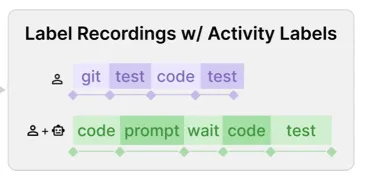
This is how the process is different between standard development process and assisted one.
I am personally more worried about the part where I spend less time researching and testing. Because this is the part when you actually expand your knowledge and dive deeper into a system. So maybe short-term it takes less effort to loop over AI suggestions, but in the long term, that would definitely hurt.
Skepticism Among Experienced Developers
The interesting part is that I know enough software engineers who are testing AI coding tools and they cannot agree AI makes them fast. I can summary their concerts into few points:
- The bigger the context, the less useful it is. It is harder to get a good solution for a task that is widespread across source code.
- Code quality is not good for long-term support.
- It is hard to get exactly what is needed from AI, it could just do not understand it. The only solution to start over, which is a time lost.
Every time I see videos and articles about 10x or 20x improvement - I know it’s a lie. Mostly it comes from people outside of software engineering and while they can get fast results - they usually don’t know the future consequences
Or from AI influencers who benefit from hype a lot.
Final Thoughts
And one last thing: it’s not always the time saved from not coding manually that can be converted into faster development.
The research I mentioned in the beginning does not have a large testing audience; it’s 16 people with 136 issues. But even there, people actually got slower compared to the time when they were just coding focused.
Maybe it is just a time when we need to adapt to new tools and change the way we actually do the work. Maybe then we could be faster.
But for now, for myself, I see improvements in specific areas where I don’t want to carry too much about the code and just get the results.
What has been your experience with AI coding assistants? Are they a productivity booster or a time sink?
$ echo "test"
✓ Thank you! You are subscribed.